

Congratulations for making the choice to take your vision into your own hands. There are 3 simple steps to get you registered and signed up, then you can be on your way.
STEP 1: REVIEW SAFETY GUIDELINES
Before you start your registration and program sign-up, please review Overbound Safety Guidelines, Waiver and Release of Liability. You will need to acknowledge your familiarity with the information while registering for the Academy.
STEP 2: LOCATE YOUR ACCESS CODE
If you are registering so that you can access the complimentary Clarity Gateway Guide, locate your access code. Open the welcome leaflet that was included in the Clarity Eyesight Trainer packaging. Take out your Academy membership card. Your unique access code is located on the back of the card. If you are registering for a paid program, you are not required to enter the code.
Note: Most Overbound Academy programs leverage selective vision obstruction provided by the Clarity Eyesight Trainer. Without occluders you will not be able to fully participate in the practice. If you do not have a Clarity Eyesight Trainer, you can order one here. You may use your own home-made tools to a certain extent.
STEP 3: START YOUR REGISTRATION & SIGN UP FOR YOUR SELECTED PROGRAM
Click on “START MY REGISTRATION” below. You will have a chance to select your desired program during the process.
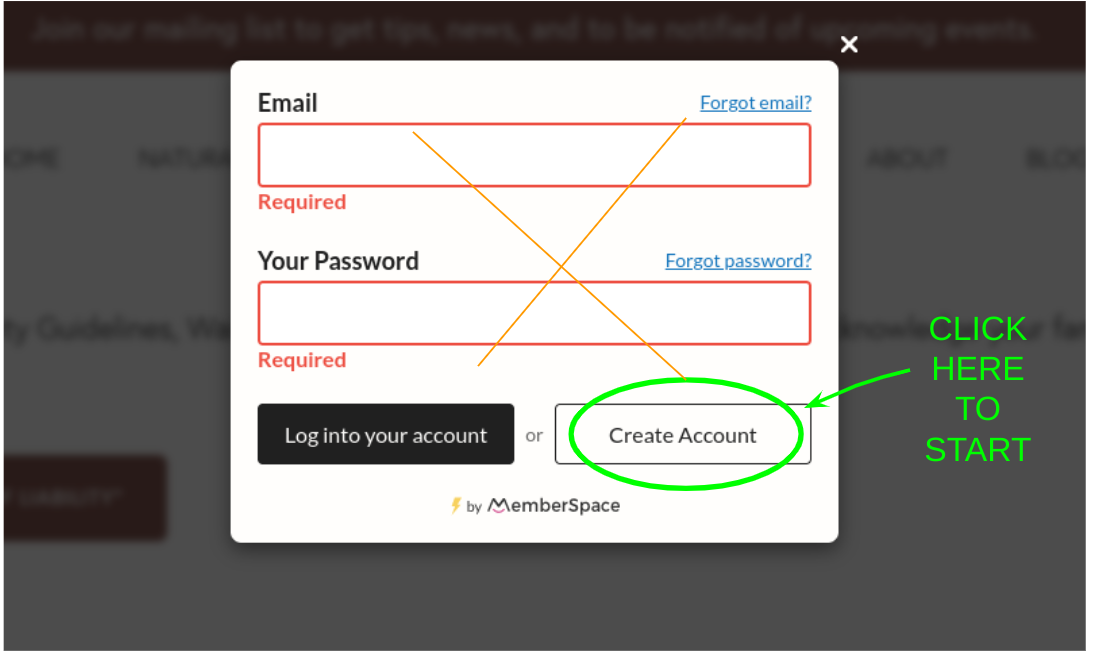
Note: When the first window opens, do not enter your email or password, click on the white button to “Create an Account”, as shown in the picture below. It should be straight forward from there.
NEED MORE HELP?